AI-Powered Captions for Every Master

Jenny
July 5, 2026
Your Track, Your Words
When we built djlynux.com, we wanted it to be more than just a mastering tool. One feature we have been quietly working on is now live: AI-powered lyric transcription and caption export built right into the mastering workflow.
Here is how it works and why it matters.
From Audio to Text, Automatically
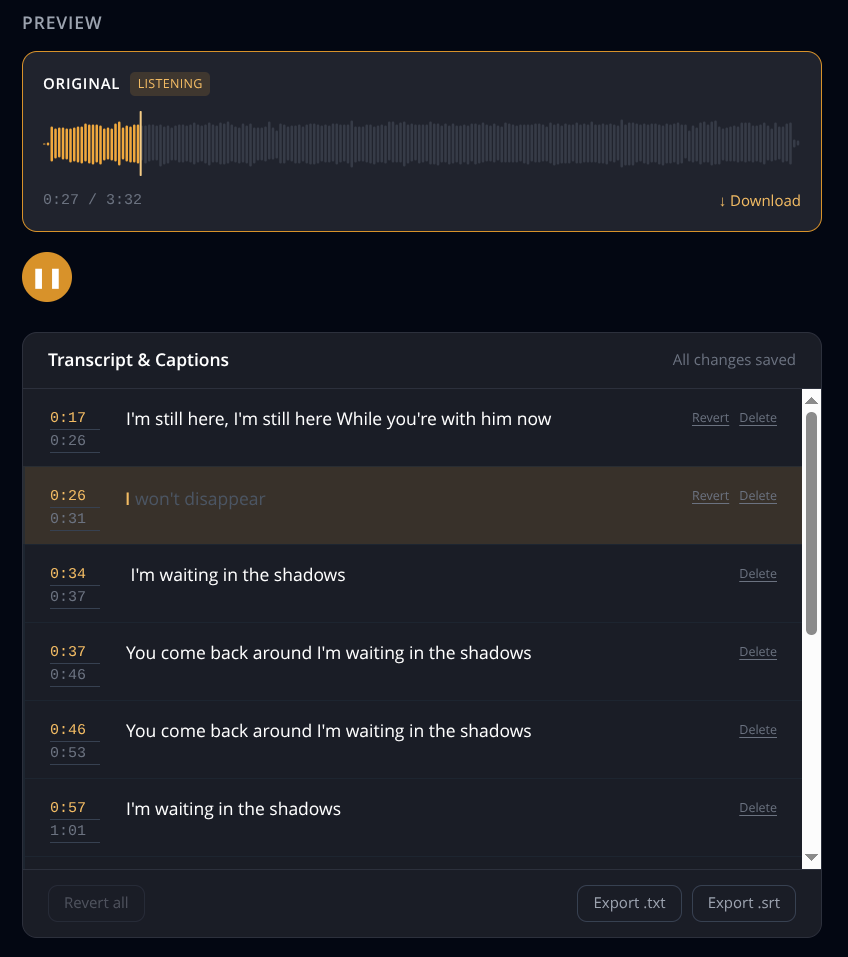
When you upload a track for mastering, djlynux does not just process the audio — it listens to the vocals and transcribes them into an editable caption set. Every line comes with a confidence flag, so you can see which parts the system is certain about and which might need a second listen.
You can then export the captions as SRT or TXT — ready for YouTube, Instagram Reels, TikTok, or your lyric sheets.
Why Captions Matter
Most AI mastering services are one-dimensional: upload a track, get a mastered file, move on. But if you are an independent artist or bedroom producer, your workflow does not end at the master. You need captions for your YouTube video, accurate lyrics for streaming platforms, SRT files for social media, or lyrics extracted from AI-generated tracks.
We built captioning into the mastering pipeline so you do not have to juggle separate tools.
Captions-Only Mode
Do not need mastering right now? You can upload a track for transcription alone. Captions-only mode costs 0.25 credits, no mastering required. Same accuracy, same editable captions, same export options.
Confidence Flags
AI transcription is not perfect, and we do not pretend it is. Each line in the output is marked with a confidence flag: high-confidence lines are reliable, low-confidence lines flag parts that might benefit from a manual check.
Currently: English Vocals
At launch, transcription supports English vocals. Support for additional languages is on the roadmap. If there is a language you would like to see prioritised, let us know.
Try It
Upload a track at djlynux.com — the captions are generated as part of the mastering pipeline, included in your free credits at no extra cost. Use captions-only mode for 0.25 credits if all you need is the transcription.