AI Mastering Explained: What Your Pre-Mix Needs Before You Upload

DJ Lynux
June 27, 2026
What Your Pre-Mix Needs Before You Upload
Every bedroom producer hits the same moment: your track sounds amazing in the DAW, you bounce it, upload it to a mastering service, and... it comes back sounding worse than you started.
Nine times out of ten, the problem isn't the mastering. It's the pre-mix.
This guide covers exactly what your mix needs before it touches a mastering chain — AI or human. No dogma. No gatekeeping. Just the numbers that actually matter.
What Is a Pre-Mix?
Your pre-mix is the final stereo bounce of your track before any mastering processing is applied. It's what you send to the mastering engineer — or, in our case, upload to djlynux.
A good pre-mix should:
- Sound balanced on its own (the mix should already feel "done")
- Have enough dynamic range for the mastering chain to work
- Be free of mix-bus limiting or compression that crushes the signal
- Be exported as a high-quality file (24-bit WAV, native sample rate)
Headroom: The Most Misunderstood Number
The single most common question we get: "What dBFS should my pre-mix peak at?"
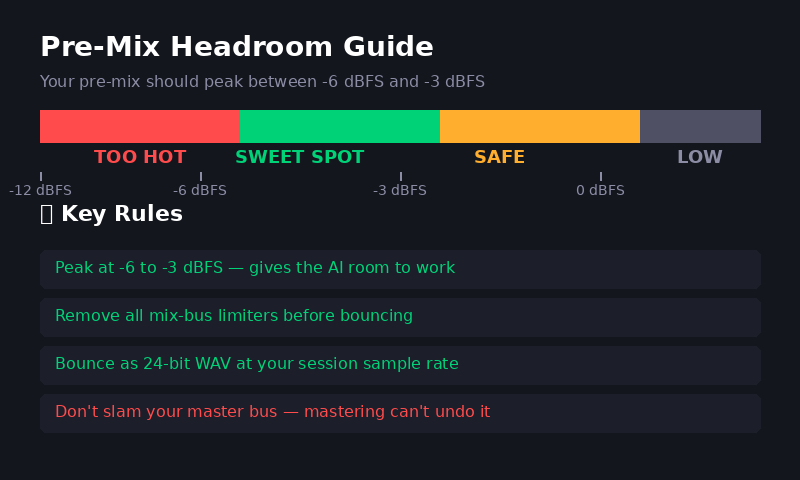
The classic answer is -6 dBFS. But the real answer is more nuanced: -6 dBFS to -3 dBFS is the sweet spot.
Here's why this range works:
- Above -3 dBFS: You're leaving almost no room for the mastering chain. Any EQ boosts or compression will push you over 0 dBFS, forcing the limiter to work harder than it should.
- Below -10 dBFS: Your mix is too quiet. The mastering stage will need to apply heavy gain, which can bring up noise floor and make the limiter work inefficiently.
- -6 to -3 dBFS: The sweet spot. Enough headroom for processing, enough level that the gain staging is natural.
What About LUFS? (Spoiler: Don't Stress)
There's a lot of anxiety about LUFS targets. "My mix needs to be at -14 LUFS!" — No. It doesn't.
Your master will be at the right loudness. Your pre-mix just needs to be in a reasonable range: -16 to -12 LUFS integrated is fine. If your pre-mix is already at -8 LUFS with a brickwall limiter, you've removed all the headroom the AI needs to work its magic.
Key rule: Let the mastering chain handle the final loudness. Your job in the mix is to make it sound good, not loud.
Streaming Platform Targets (2026)
Once your track is mastered, it hits the streaming platforms. Here's what each one normalizes to:
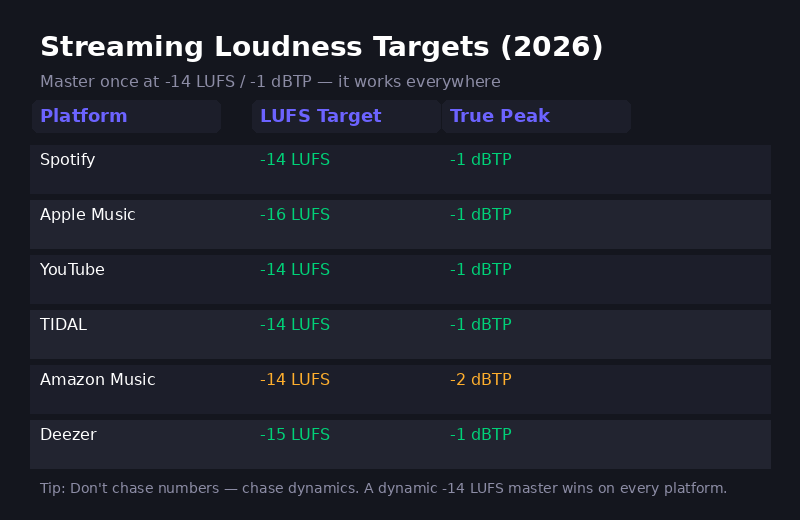
Notice something? One master at -14 LUFS integrated with a -1 dBTP ceiling works everywhere. The only exception is Amazon Music which requires -2 dBTP — a safer ceiling anyway, since lossy codecs can introduce inter-sample peaks.
Pushing your master to -8 LUFS doesn't make it louder on streaming. It just makes it more distorted when the platform turns it down.
How AI Mastering Actually Works
Here's what happens when you upload your pre-mix to an AI mastering service like djlynux:
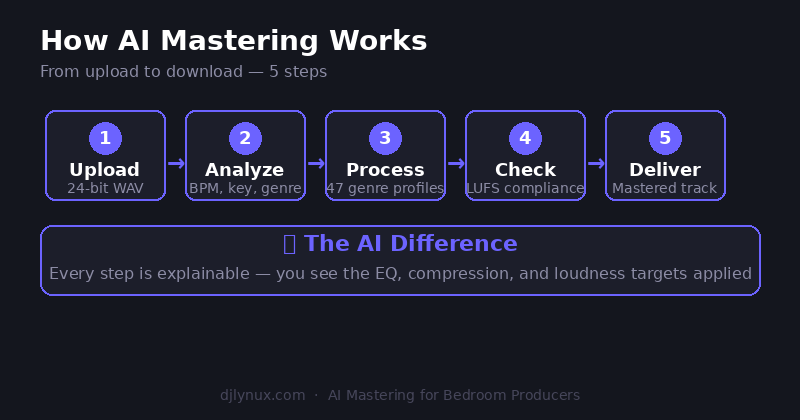
- Upload: Your 24-bit WAV file is received and analyzed for format compliance.
- Analyze: The AI detects tempo, key, genre, dynamic range, and frequency balance.
- Process: Genre-specific profiles apply EQ, compression, stereo enhancement, and limiting — tailored to dance music, hip hop, rock, acoustic, and everything in between.
- Check: Loudness compliance is verified against streaming targets with true-peak ceiling protection.
- Deliver: Your mastered track is ready to download and distribute.
The key difference with djlynux? Every step is transparent and explainable. You see the EQ curves applied, the compression settings, the loudness targets — no black box.
Common Pre-Mix Mistakes
After processing thousands of tracks, here's what we see most often:
- ❌ Slamming the mix bus limiter: Mastering cannot undo a crushed signal. Remove limiters from your master bus before bouncing.
- ❌ Sending MP3s: Lossy codecs discard high-frequency detail. Always bounce 24-bit WAV at your session's native sample rate.
- ❌ Targeting loudness instead of dynamics: A dynamic -14 LUFS master will sound louder and punchier after normalization than a squashed -8 LUFS one.
- ❌ Separate masters for each platform: One master at -14 LUFS / -1 dBTP works across Spotify, Apple Music, YouTube, TIDAL, and Deezer.
The Pre-Mix Checklist
Before you export, run through this:
- ✅ Peaks between -6 and -3 dBFS
- ✅ No mix-bus limiter or compression
- ✅ Bounced as 24-bit WAV at 44.1kHz (or your session rate)
- ✅ Stereo (not mono)
- ✅ Mix sounds balanced without mastering
- ✅ No clipping on the master bus
Ready to Test Your Pre-Mix?
Your first master on djlynux costs nothing. Upload your pre-mix, see exactly what the AI does, and hear the difference transparent mastering makes.